As B2B enterprises scale, the demand for operational speed and quick data access intensifies. With the rollout of the Salesforce 2025 releases, the focus has shifted away from novelty features toward practical, high-impact upgrades designed to eliminate administrative overhead. For systems administrators and end-users alike, the priority is clear: maximizing efficiency and reducing the friction of daily operations.
When your CRM is deeply connected to back-office systems like ERPs and FSM platforms, maintaining data hygiene and security can become complex. The latest Salesforce updates provide a crucial foundation for maintaining data hygiene and security in back-office systems like ERPs and FSM platforms, which enables smarter workflows, mobile-ready data visibility, and accelerated reporting.
Administrative Bottlenecks and Fragmented Workflows
Historically, managing a robust Salesforce org involved tedious, click-heavy workflows. Administrators spent countless hours navigating disparate permission sets or waiting for comprehensive dashboards to load. For field sales teams, the mobile experience severely lacked the dynamic data visibility available on desktop, forcing them to toggle between screens or rely on manual data entry to update records.
Furthermore, as companies integrate sensitive back-office data—such as ERP inventory, accounting details, or service histories—ensuring strict, transparent security access became an operational challenge. The tools, rather than the data itself, became the bottleneck.
Standout Features in the Salesforce 2025 Release
The new updates introduce several fundamental shifts in how administrators and users interact with the platform, directly addressing these legacy challenges. (Note: You can explore the granular technical breakdowns on the official Salesforce Release Notes site).
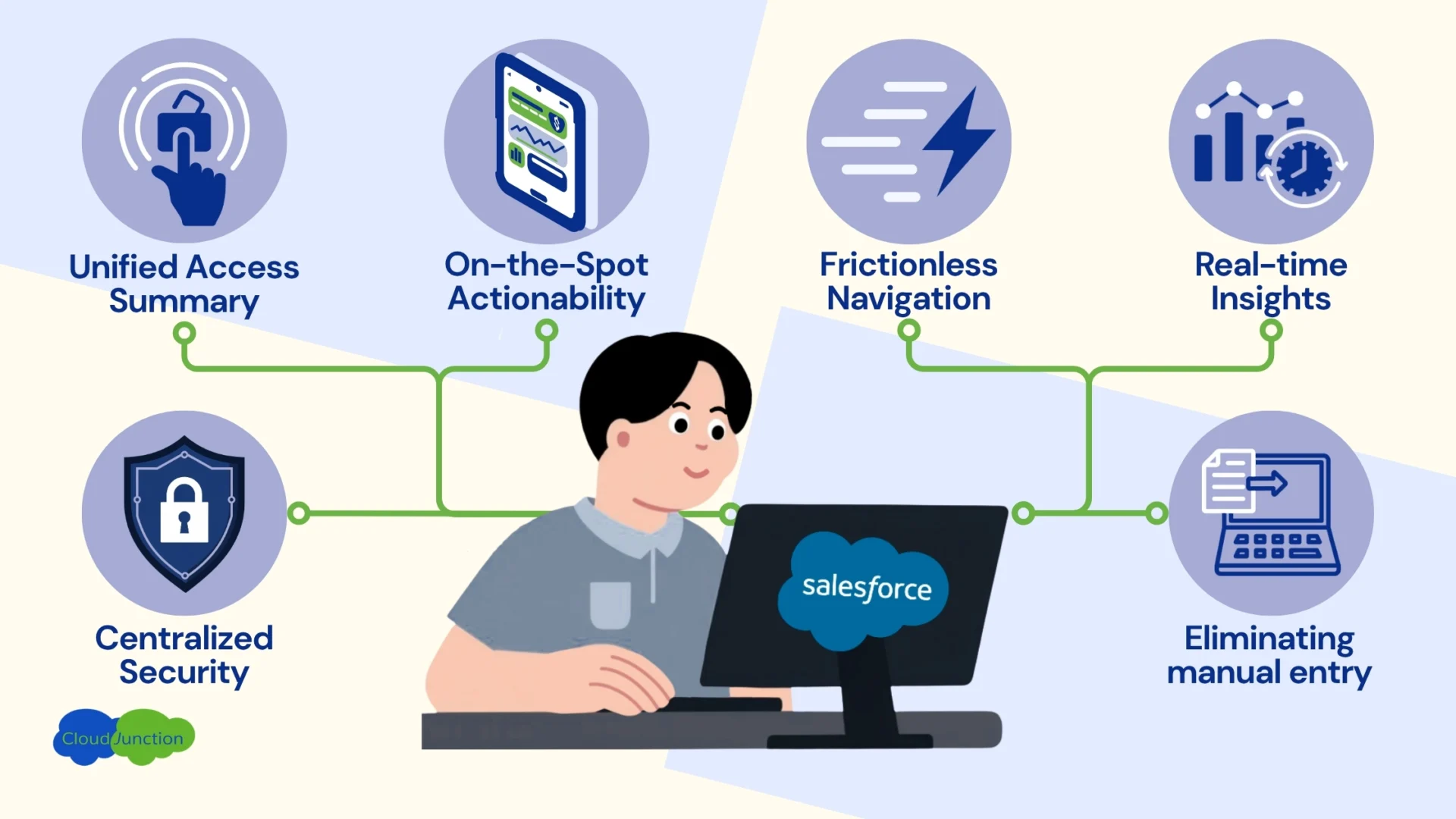
1. Centralized Security
The new Object Manager Access Summary breaks down the traditionally tedious and error-prone access provisioning workflows by allowing administrators to update object permissions for all custom profiles and permission sets from a single, unified screen.
- Why it matters: This drastically reduces administrative busywork and prevents dangerous permission oversights. For organizations leveraging Salesforce-native iPaaS to integrate sensitive ERP or payroll data, this centralized control is essential for maintaining strict data governance and compliance without the headache!
2. The Unified User Access Summary
Troubleshooting user access is no longer a scavenger hunt across multiple setup menus! The User Access Summary provides a consolidated view of a user’s permission sets, public groups, and queues.
- Why it matters: Instant visibility into who can see and do what accelerates troubleshooting and reinforces CRM hygiene, enforcing security for the interconnected back-office data.
3. On-the-Spot Actionability
Field reps require immediate access to relevant context and data without navigating clunky interfaces. The Dynamic Related List single component is now available in beta for the Salesforce mobile app, allowing the rep to bring powerful, filtered data views directly on the road.
- Why it matters: The delay introduced by manual searches is completely eliminated, enabling the rep to stay focused entirely on the customer, with relevant real-time data to inform their decisions.
4. Frictionless Navigation
The List View selector has now been heavily optimized for speed and accessibility. Users can now sort by up to five columns, easily scroll through 100 list views, and utilize a new search bar for instant access to their most-used data segments.
- Why it matters: It introduces a smoothness in daily navigation, saving time for high-volume users who need to switch contexts rapidly.
5. Real-Time Insights
With the Salesforce 2025 release, your dashboards have evolved into comprehensive storytelling tools. Users can now add rich text widgets, multi-language labels, and visual KPIs to communicate goals effectively. More importantly, users can now refresh individual widgets rather than reloading massive, data-heavy dashboards.
- Why it matters: Leaders can curate their sales pipelines or synced ERP revenue metrics to reflect the most relevant, impactful, and aggregated data–all before their coffee cools!
6. Eliminating Manual Entry
For teams managing high-volume data, updating records historically meant tackling them one by one. With Inline Report Editing, users can now edit data directly within the report view, functioning much like a spreadsheet.
- Why it matters: This is a massive productivity win that dramatically reduces manual data entry. Users can quickly correct statuses or adjust values without breaking their workflow (or their keyboard!).
The Recipe: Master the Release with Agentic Connectivity
The Salesforce 2025 release delivers the practical, time-saving tools necessary to optimize your CRM. However, true digital transformation happens when these streamlined interfaces are paired with intelligent back-office connectivity.
By leveraging a solution like ConnectJunction, businesses can build upon these new Salesforce features using a zero-copy architecture. Imagine viewing real-time ERP data through the newly mobile Dynamic Related Lists, or using Agentforce AI agents to automatically update the fields you are tracking in your enhanced Dashboards—all without conventional ETL overhead or manual data entry.
Explore further with our Salesforce Walk-in Clinics!
When you combine Salesforce’s smart new operational tools with seamless ERP integrations, you don’t just work faster—you build a connected, intelligent B2B enterprise. Bring your real-world adoption challenges to our Salesforce Walk-in Clinics. Ask questions and get practical, expert-driven solutions to maximize your use of the 2025 release and connected integrations.